Wrizzit for Dummies
Your no-nonsense guide to using Wrizzit. Intended for migrants from Substack.

Feb 26, 2026 · 6 min read

Contents
Introduction
The Wrizzit Philosophy
Profile Page
Banner
Profile Picture
Display Name & Handle
Rizz
... reads in the last 30 days
Badges
The Feed
Digests
Messages & Message Privacy
Conclusion
Introduction
WELCOME TO WRIZZIT my friends! I'm sure you have many, many questions, and I am more than happy to answer them! This post will be your complete, one-stop reference for all-things Wrizzit! I will try my best to keep the information here accurate and up-to-date whenever new features are added or changed. So, if you ever feel lost, don't be afraid to ask!
Disclaimer: I have no relation to the development of Wrizzit past that of a normal user. I do not claim to have 'ultimate knowledge' of this platform nor its functionality. If you find a mistake in this post, or information that is missing, please do not hesitate to let me know!
Ultimately, the whole point of this place is freedom and community. So, feel free to create your own spin on this guide! Your input and suggestions will always be appreciated here! <3
The Wrizzit Philosophy
Wrizzit is a space for writers to collaborate with each other and share their work in a safe environment. It focuses on community-building, and rewards active engagement with other writers as well as your own work.
It is an entirely community-driven project, with a quick-and-easy way to suggest new features. If you enjoy writing and building a small community that you love, Wrizzit is the place for you!
Profile Page
Your profile page is where all of your magic happens. Every post, every scribble and every comment you share on Wrizzit is visible here. There are a number of different things that can be pretty overwhelming to a new user who doesn't know what's going on. So, let me help you out with an example!
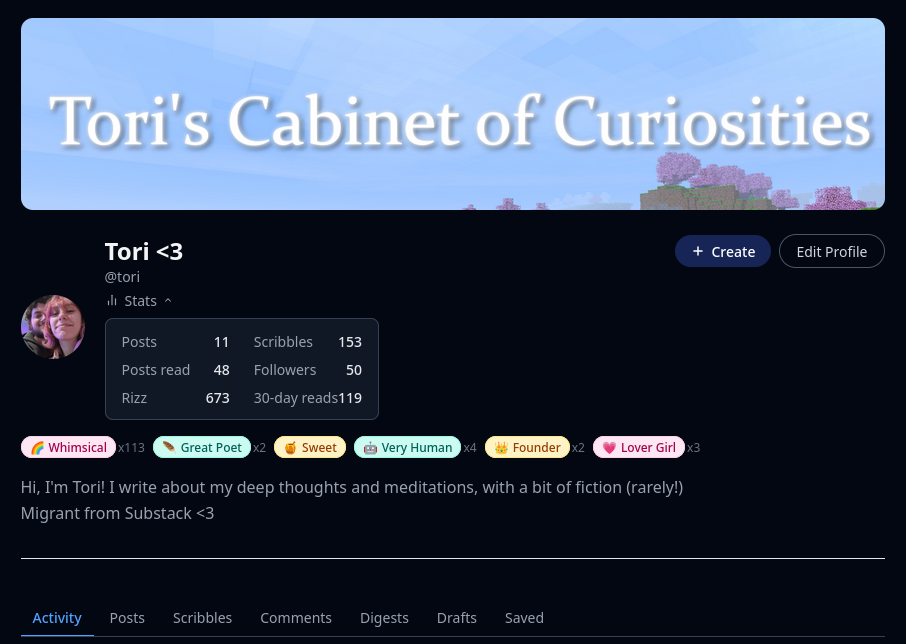
This is my view of my profile page, at the time of creating this post. As you can see, its layed out in a similar way to Substack, but has some differences. So, let's go from top to bottom, and explain everything.
Banner
Your banner is a large image that goes across the top of your profile page. There is no specific size requirement for this image, though it is best to go for one that fits nicely into the image box. Mine is 1200x400 pixels in size. You can set this in the 'Edit Profile' dialogue.
Profile Picture
Your profile picture is a small icon that will show on all of your posts, scribbles, and comments. It is the thing that should be most identifiable to you! Again, any image size is allowed but I would recommend going for a smaller, square image for yours.
Display Name & Handle
You handle is a unique identifier of your account. No one else can have the same handle as you. Your profile itself lives at 'wrizzit.com/writer/<handle>`. Your display name, however, is what people see next to your profile picture in posts, scribbles and comments. Make it something unique to yourself <3
Rizz
Rizz is an accumulation of all of the likes and dislikes you have received on Wrizzit. Every like increases your Rizz by one, every dislike decreases it by one. The higher your Rizz, the more people have enjoyed your stuff!
... reads in the last 30 days
This number shows you how many people have read any of your long-form posts in the last 30 days. As far as I am aware, it is the only view information you can get.
Badges
Badges are little awards that can be given to you by any user on Wrizzit. A badge will remain active on your profile for 24 hours, after which it will enter your Badge Box. Your badge box is a permanent collection of every single badge you have been awarded during your time on Wrizzit.
When editing your profile, you can select (up to) 6 badges to display permanently on your profile, and one 'primary' badge that will be shown alongside your name in the feed, on posts, and in comments.
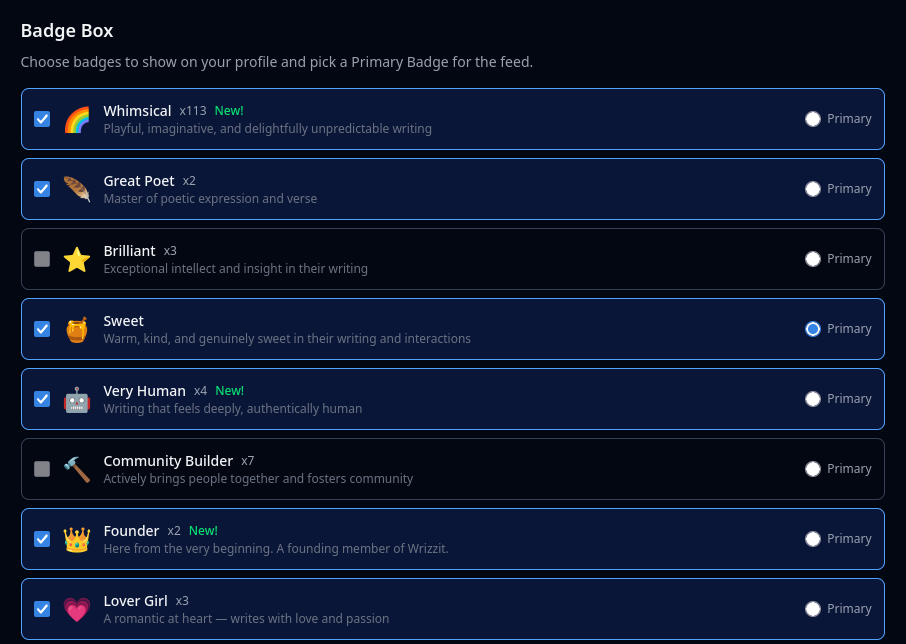
Badges can be granted to you by any user on the site. Giving people badges is free, so go wild! You can award a badge to a user from their profile page.

The Feed
The Feed is the place to find new posts and Scribbles.

At the time of writing, it is split into 5 individual feeds:
Newest
For You
Following
Popular
Scribbles
Each one of these are pretty self explanatory: 'Newest' shows all of the newest posts and scribbles on Wrizzit, and is therefore a great way to stay up to date with everyone on the platform and find new writers. 'For You' is a curated feed containing people you follow and posts/scribbles of a similar style. 'Following' will only show you scribbles and posts from people you follow. 'Popular' will show you the most popular content on the platform at the time, and 'Scribbles' is the same as 'Newest', but will not show any posts.
If you are on the desktop site, you can also browse posts only by clicking any of the buttons on the right-hand of the feed, allowing you to browse posts by genre and subject.
Digests
Digests are Wrizzit's most unique feature. While other stuff on this platform may be similar to that on sites such as Substack or Tumblr, Digests are uniquely Wrizzit.
A digest is a collaborative writing effort by users all across Wrizzit. They can be curated, allowing only certain contributions, or, in the case of 'Open Prompts', all contributions submitted will be shown when the digest is posted.
'Magazines' are regular, reoccurring events set up by people. They allow people to request permission to join (which is not needed if you are invited to join a magazine), and then 'submit' a new post. When the deadline closes, the creator of the magazine will review posts and select those that will be on the final publication. Then, when the post date is reached, all of the curated posts will be visible by the public. Think of it as a poetry anthology or academic journal, but for all works of writing instead.
'Events' are almost identical to Magazines, except for the fact that they are not reoccurring. An event will only run once, and when its closed, its closed. These are good for one-time competitions or collaborative posts with other users!
And finally, 'Open Prompts'. These allow users to create a prompt, and challenge all of Wrizzit to create the best work they can based on that. Every single submission to a prompt will be included when it is posted, though the creator can 'Highlight' their favourite submissions. Anyone can take part in an Open Prompt.
After joining a Digest, you will have the option to submit a post to it when creating a new post. Simply click on the 'Sumbit to Digest' button, then select the digest you wish to submit to.
All of your submissions can be viewed under the 'Drafts' section of your profile. From here, you can also edit your submitted posts that are still awaiting review.
Direct Messages & Message Privacy
You can send a user a direct message by going to their profile page and clicking on the 'Message' button.
When editing your profile, you can select who can message you. The options currently available are:
Everyone
Followers Only
Off
This provides some (admittedly, rather crude) privacy and screening options for direct messages.
Conclusion
And that's it for now! If there is anything you would like more clarification for, or information that is incorrect/missing, please leave a comment and let me know. Happy scribbling!
~~ Tori <3
Edits
26.02.2026 - Added badge box information, at the request of @noh.
03.03.2026 - Updated 'Badges' and 'Digests' sections, and added 'Direct Messages & Message Privacy' section.
Comments (13)



Updates to add: - Digests are now shown on your profile under "Digests" - When you submit to a Digest, you can find your submission and edit it when gou go to your profile and select "Drafts" - You can also message someone privately via the three dots on someone’s profile. In your profile settings you can select who can message you!


You might consider adding a Settings section. I find the export function particularly useful. I wrote a tool to convert export files to a standalone websites for anyone needing this functionality. www.wrizzit.com/post/wrapping-wrizzit



Ooh, we've got some really interesting features here! Excited to see what comes from all this

This is great! I love that you put this together! Two things though.. Is it okay to use that image as the thumbnail? and maybe mention that badges expire displaying on your profile, but in the Badge Box you can select any you have ever received to display still, so they only sort of expire! Thanks again!